Skip to content
taco

Best remote desktop apps for controlling a Mac from iPhone & iPhone Duo (2026)

Nine options compared with verified pricing, iPhone Duo laptop-mode support, privacy architecture, and honest limits — including where taco is not the right choice.

Last verified November 27, 2026 · 9 core apps + 3 notable Duo tools · Checked Nov 2026

What phone-first Mac control actually looks like

Instead of squeezing a 4K monitor into a tiny VNC frame, taco reshapes your Mac to each Apple device and keeps a real Mac keyboard and trackpad permanently below.

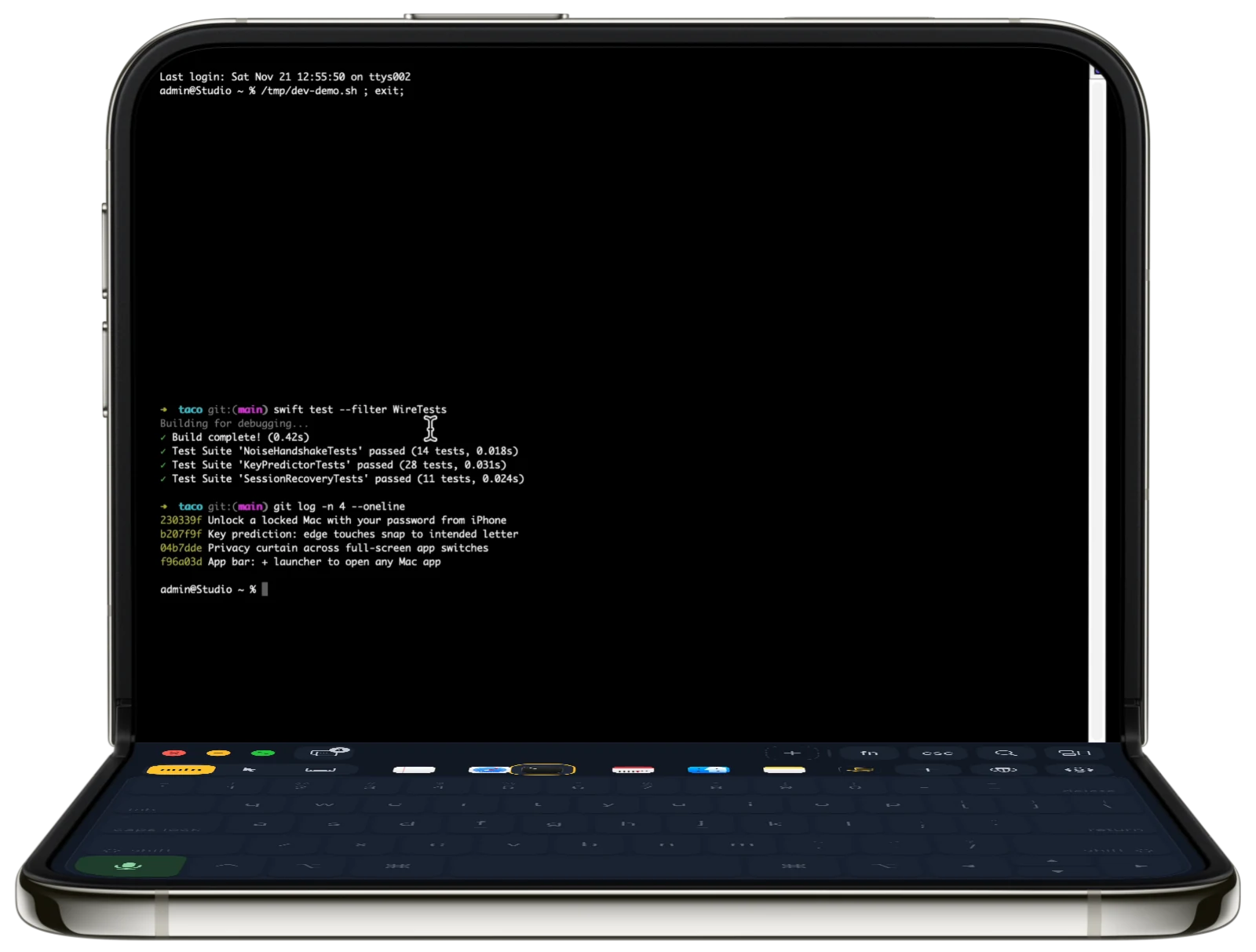
Folded Night Sky iPhone Duo running macOS Terminal via taco in laptop mode.
Folded 90° laptop poseiPhone Duo

Full Mac Terminal or desktop apps upright above the hinge, real Mac keys flat below.

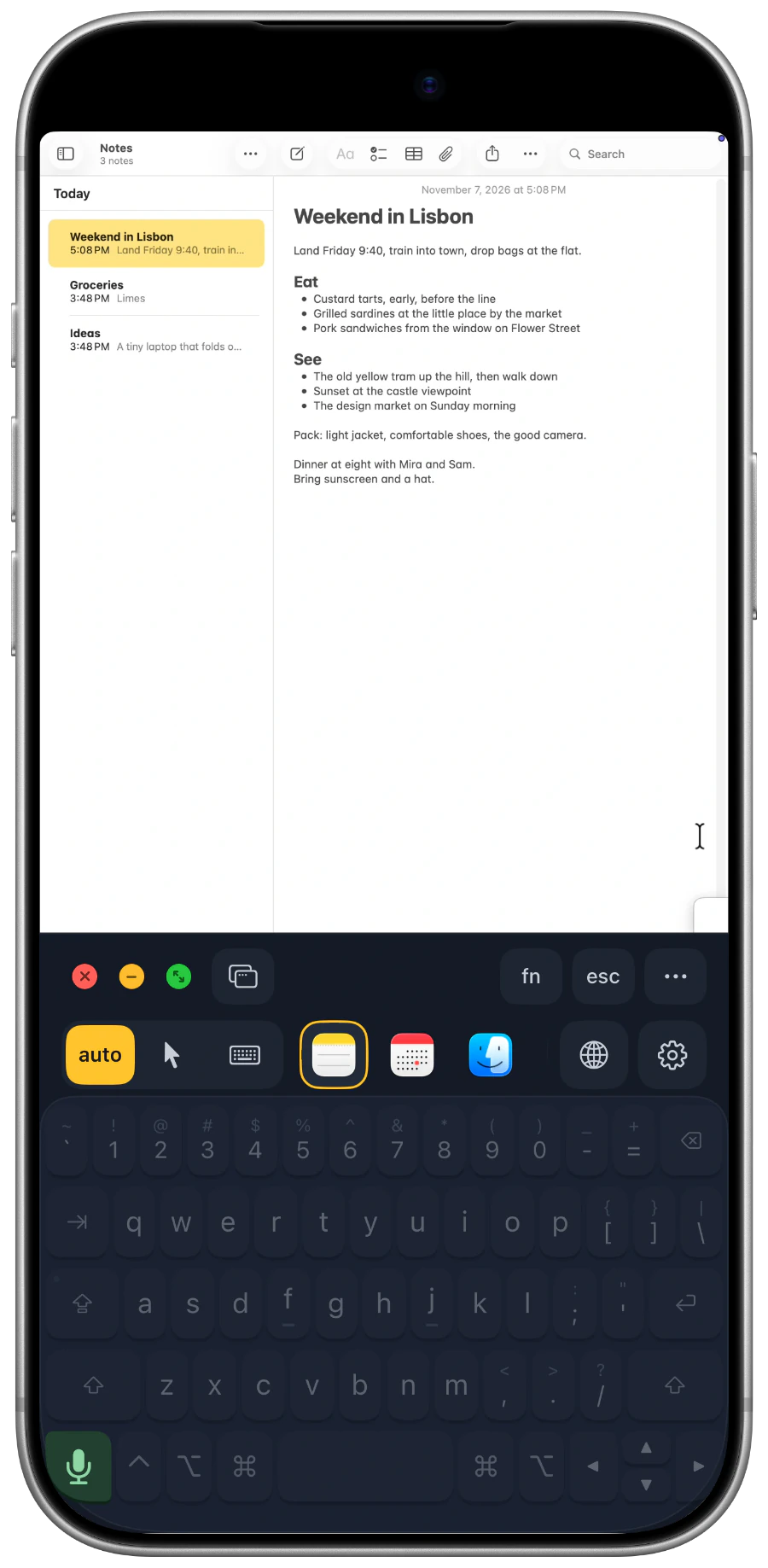
Upright iPhone 18 Pro Max running macOS Notes via taco with Mac keyboard and trackpad below.
Readable upright layoutAny iPhone

Auto-scaled macOS screen on top, zero iOS keyboard blocking your active window.

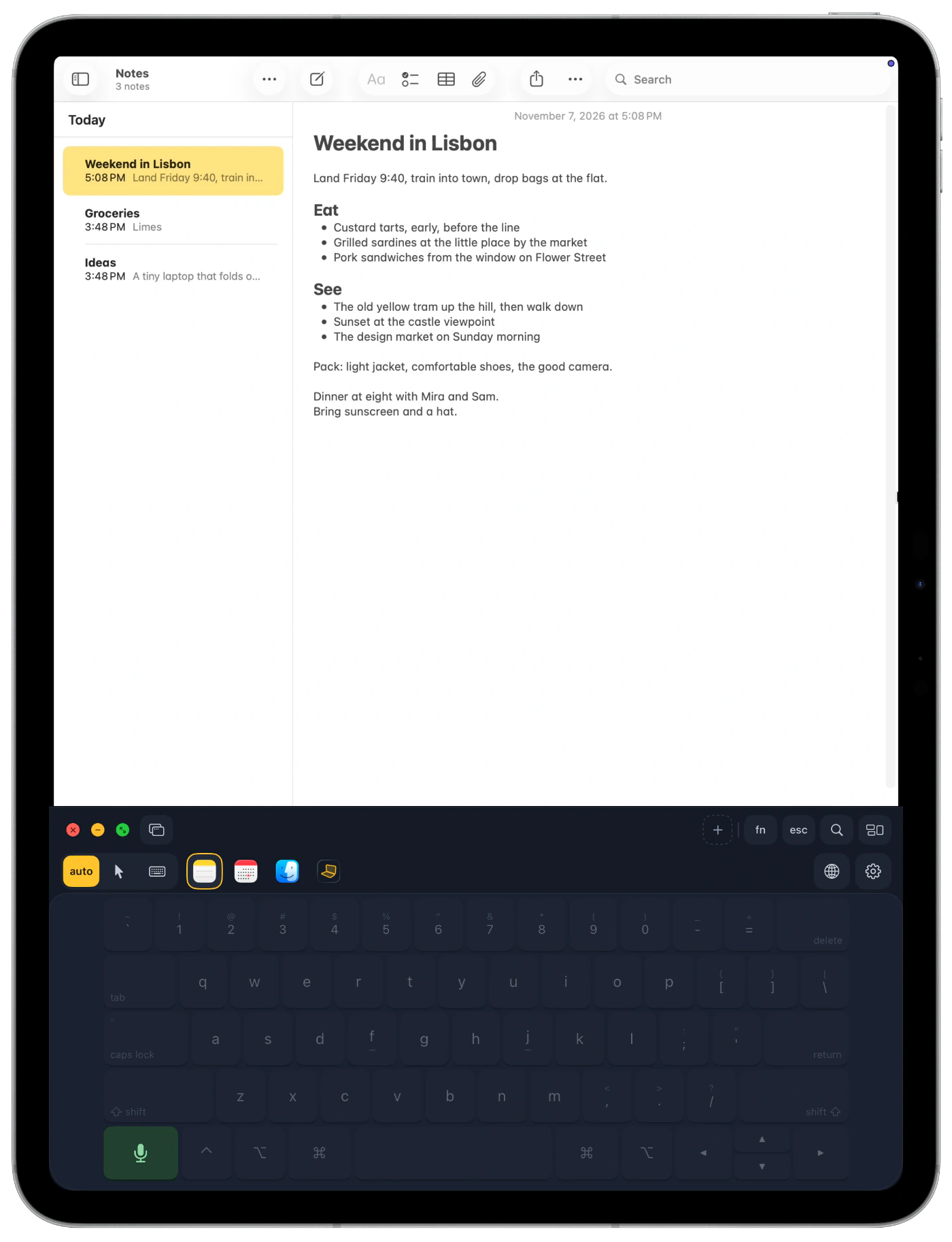
iPad Pro 13-inch running macOS Notes via taco above a full-size Mac keyboard.
Full-size Mac deck on iPadiPad

Portrait or landscape with direct peer-to-peer Wi-Fi or Tailscale streaming.

Side-by-side comparison (2026)

Disclosure: we build taco. Every competitor entry below reflects current public documentation and App Store pricing as of November 2026, and we explicitly list where other apps beat taco.

Comparison of 9 Mac remote desktop apps for iPhone and iPhone Duo
AppPricingiPhone Duo ModeDisplay FitConnection & PrivacyHost OS
tacoFoldable-first Mac remote desktopFree iOS app · Mac $19/yr (up to 10 Macs)Native 90° laptop pose, fused keyboard+trackpad & per-app hinge barYes — dynamic virtual display reshaping & crash-safe window restoreDirect P2P (Noise_XX AES-256-GCM) over Wi-Fi or Tailscale; no cloud account or relaymacOS 26+
Jump DesktopFast cross-platform remote desktop$14.99 one-time (iOS) · $34.99 (Mac client); free hostStandard viewport (no fused laptop deck)Optional resolution match on FluidJump Connect account / Fluid, RDP, or VNCmacOS, Windows, Linux
Screens 5 (Edovia)Long-running Apple-ecosystem VNC client with Duo Laptop Mode$4.99/mo, $29.99/yr, or $249.99 lifetime (universal)Yes (v5.10.6+ Laptop Mode: Mac screen on top, virtual keyboard & trackpad below)macOS Screen Sharing / VNC (High Performance mode resizes remote desktop; no crash-safe window layout restore)macOS Screen Sharing / VNC + Screens Connect account/relay or TailscalemacOS, Windows, Linux, Raspberry Pi
YoseiDuo-aware virtual display & MCP viewerFree during TestFlight beta (final pricing unannounced)Cover, unfolded, and half-folded laptop layoutsYes — custom virtual display matching iOS aspect ratioDirect USB-C, Wi-Fi, or Tailscale; no cloud serverApple Silicon macOS 26+
SillOpen-source single-window & desktop streamerFree & open source (Apache 2.0)Adapts to cover, flat, and half-folded Duo statesStreams individual Mac windows or full desktopDirect HEVC over Wi-Fi, USB, or Tailscale; no accountmacOS
RemioHigh-FPS cross-platform remote desktopFree tier · Remio Pro $1.99/moPro tier unlocks Duo laptop keyboard/trackpad layoutUp to 6K 120 FPS & HDR; closed-lid MacBook supportEnd-to-end encrypted P2P (local & remote)macOS, Windows, Linux
Chrome Remote DesktopFree Google-account remote accessFreeNone (basic viewport)No automatic phone reshapingGoogle account + Google cloud relaymacOS, Windows, Linux
RustDeskOpen-source self-hostable remote desktopFree open-source (paid pro server tiers for teams)None (traditional remote viewport)No automatic phone reshapingPublic relay or self-hosted relay servermacOS, Windows, Linux, Android
macOS Screen Sharing (VNC)Built-in macOS VNC server (no official iOS client)Built into macOS (requires third-party iOS VNC app)Depends on iOS VNC viewer (usually none)No — streams full Mac monitor resolutionLocal LAN VNC (or over VPN/Tailscale)macOS

App-by-app breakdown

taco

macOS 26+

Free iOS app · Mac $19/yr (up to 10 Macs)

Best for:
iPhone Duo owners and Mac users who want zero-mode-switch typing + pointing, dynamic display reshaping, built-in Practice Mac, and zero cloud relay.
Input & display:
Fused Mac keyboard (⌘⌥⌃, esc, arrows) + trackpad on one surface, edge-touch key prediction, dictation key. Yes — dynamic virtual display reshaping & crash-safe window restore.
Trade-offs:
Mac-only host; requires macOS 26+ and iOS/iPadOS 27.1+; remote access away from home uses your own Tailscale tailnet rather than a hosted relay.

Jump Desktop

macOS, Windows, Linux

$14.99 one-time (iOS) · $34.99 (Mac client); free host

Best for:
People who control Windows and Linux machines alongside a Mac and prefer a one-time iOS purchase.
Input & display:
Separate toolbar + iOS keyboard overlay. Optional resolution match on Fluid.
Trade-offs:
Requires a Jump Connect account for easy away-from-home access; phone UI treats your screen like a traditional shrunk desktop.

Screens 5 (Edovia)

macOS, Windows, Linux, Raspberry Pi

$4.99/mo, $29.99/yr, or $249.99 lifetime (universal)

Best for:
Users who want Laptop Mode on iPhone Duo alongside Windows/Linux/Raspberry Pi hosts, older macOS versions, or Apple Vision Pro.
Input & display:
Separate virtual keyboard & trackpad controls, customizable shortcut bar, and dictation options. macOS Screen Sharing / VNC (High Performance mode resizes remote desktop; no crash-safe window layout restore).
Trade-offs:
Higher annual/lifetime price; separate keyboard/trackpad controls instead of a fused single-surface deck, no crash-safe window layout restoration, and away-from-home relay relies on Screens Connect unless paired with Tailscale.

Yosei

Apple Silicon macOS 26+

Free during TestFlight beta (final pricing unannounced)

Best for:
Developers monitoring background AI agents via MCP or wanting wired USB-C display streaming.
Input & display:
On-screen trackpad + keyboard below fold. Yes — custom virtual display matching iOS aspect ratio.
Trade-offs:
Currently distributed through TestFlight beta (subject to beta slot caps) with unannounced final pricing.

Sill

macOS

Free & open source (Apache 2.0)

Best for:
Users who want a free, open-source utility focused on streaming single Mac windows without paying.
Input & display:
Trackpad + key row; strong Apple Pencil support. Streams individual Mac windows or full desktop.
Trade-offs:
Window-centric workflow differs from a full reshaped Mac desktop with per-app hinge shortcut buttons and fused predictive keyboard.

Remio

macOS, Windows, Linux

Free tier · Remio Pro $1.99/mo

Best for:
Cross-platform users who want Windows + Mac access, high-frame-rate HDR streaming, or a free starter tier.
Input & display:
Virtual laptop deck on Pro; standard touch on free tier. Up to 6K 120 FPS & HDR; closed-lid MacBook support.
Trade-offs:
Duo laptop keyboard/trackpad and multi-display features sit behind the monthly Pro subscription; less macOS-specific workflow polish.

Chrome Remote Desktop

macOS, Windows, Linux

Free

Best for:
Occasional emergency check-ins when you want $0 cost and already live in Google’s ecosystem.
Input & display:
Basic touch cursor + standard iOS keyboard. No automatic phone reshaping.
Trade-offs:
Requires a Google account and cloud relay; awkward tiny desktop view and no real Mac modifier deck on a phone.

RustDesk

macOS, Windows, Linux, Android

Free open-source (paid pro server tiers for teams)

Best for:
IT admins and cross-platform tinkerers who want to self-host their own relay infrastructure across OSes.
Input & display:
Standard mobile remote toolbar + iOS keyboard. No automatic phone reshaping.
Trade-offs:
Not designed for iPhone Duo ergonomics or touch-first Mac typing; requires self-hosting for full relay privacy.

macOS Screen Sharing (VNC)

macOS

Built into macOS (requires third-party iOS VNC app)

Best for:
Quick Mac-to-Mac screen sharing (Apple does not ship an official iOS Screen Sharing client).
Input & display:
Depends on VNC client; usually poor Mac key access. No — streams full Mac monitor resolution.
Trade-offs:
Apple only ships the Screen Sharing client on macOS; iPhone users still need a third-party iOS app, and raw VNC is sluggish and cramped on phones.

Other 2026 iPhone Duo & Mac remote tools worth knowing

The iPhone Duo ecosystem is moving fast. Alongside the nine apps in the table above, three other Mac-focused tools come up often in 2026 discussions:

iPhone Duo Mac control

Headroom

A 2026 iPhone Duo remote app built for controlling a Mac from the folded form factor. Worth comparing alongside taco, Yosei, and Sill if you are testing dedicated Duo-first Mac tools.

Open-source cross-platform Duo remote

Remote Duo

Open-source remote desktop software (iRunTech) that controls Mac, Windows, and Linux machines from an iPhone Duo — a strong pick if you want open-source cross-platform coverage across desktop OSes.

Headless Macs & AI coding agents

Astropad Workbench

Built for remote access to headless Macs running AI coding agents, with v1.4 (Oct 2026) adding native iPhone Duo and terminal support — worth a look if your primary workflow is headless agent monitoring.

When you should not pick taco

  • You need Windows or Linux access. taco is strictly Mac-to-iPhone/iPad. Pick Jump Desktop, Remio, or RustDesk instead.
  • Your Mac runs macOS 15 or older, or your iPhone is below iOS 27.1. taco relies on modern macOS 26+ virtual-display APIs and iOS 27.1+. Pick Screens 5 or Jump Desktop for older OS versions.
  • You want hosted away-from-home relay without installing Tailscale. taco refuses to run cloud relay servers for privacy reasons. If you prefer a vendor-hosted relay with a login account, Jump Desktop or Screens Connect is simpler.
  • You only want to stream a single Mac window for free. Check out Sill, which is Apache 2.0 open source and designed around single-window streaming.

Frequently asked questions

What is the best remote desktop app for controlling a Mac from an iPhone Duo?

For a dedicated Mac-first laptop pose with automatic display reshaping, crash-safe window restoration, a fused Mac keyboard + trackpad, and Noise-encrypted direct peer-to-peer access, taco is purpose-built for the iPhone Duo. If you want free open-source single-window streaming, look at Sill; if you also need Windows or Linux hosts, look at Remio or Jump Desktop.

Can Apple’s built-in iPhone Mirroring show my Mac screen on my iPhone?

No. Apple’s iPhone Mirroring and AirPlay only go from iPhone to Mac (or TV). Apple does include a macOS Screen Sharing (VNC) server, but it does not ship an official iOS Screen Sharing client — so controlling a Mac from an iPhone requires a third-party app.

Which Mac remote desktop apps work without a cloud account or relay server?

taco, Sill, and Yosei all connect directly peer-to-peer over local Wi-Fi or your own Tailscale tailnet without requiring a cloud account or passing your screen through vendor relay servers. Screens 5 and raw VNC clients can also connect directly over Tailscale if you skip cloud relay services.

Which app is best if I control both a Mac and a Windows PC from my iPhone?

Jump Desktop ($14.99 one-time on iOS) and Remio (free tier, $1.99/mo Pro) both support macOS, Windows, and Linux hosts. RustDesk is another cross-platform open-source option if you prefer to self-host your own relay.

Try taco on your iPhone Duo, iPhone, or iPad

Test the keyboard and trackpad right now using the built-in Practice Mac in the free iOS app — then pair your own Mac in a minute.

Free for 7 days, no credit card required. Then $19 a year.

Get taco for iPhone and iPad, free on the App Store.

Keep reading